Frequently Asked Questions
What is K@TE?
K@TE (pronounced "Kate") represents "Knowledge and Training Excellence" and is the University of Tennessee's comprehensive Learning Management System for training and professional development.
K@TE is a collaborative learning initiative implemented in 2017 by three different programs at UT. Through K@TE, UT employees are able to register for and take training, as are external UT stakeholders and customers.
What type of training is available in K@TE?
Depending on your UT campus affiliation or the UT program offering your training, you will be able to search and register for different instructor-led (face-to-face) training opportunities in K@TE, as well as online courses that are available to you 24/7.
I am having trouble launching an online course in K@TE. What should I do?
If an online course is not launching properly, ensure you have allowed pop-ups for the K@TE application first. To check this, launch the online course again and then allow pop-ups for the K@TE website. (Depending on the Internet browser you are using, this pop-up message might appear at the top of the browser window.)
How do I find my transcript in K@TE and how do I access my completed courses in K@TE?
To view your transcript in K@TE, choose “View Your Transcript” under the “Learning” dropdown menu. The default view for your transcript in K@TE is any active training items for which you have registered or are in the process of taking. Click on the “Active” button to view the “Completed” option on the dropdown menu and to access all of your completed courses in K@TE.

I need to access my completion certificate for a training I completed in K@TE. How do I do that?
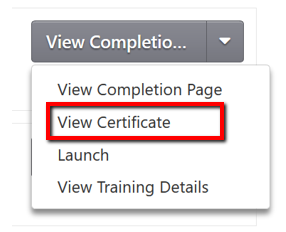
When you have completed all requirements of the particular training item in K@TE, the course will appear on the completed page of your transcript. To view your completion certificate, click on the “View Completion Page” button to the right of the item and then choose “View Certificate” from the dropdown menu. Adobe Acrobat Reader is required to view training completion certificates in K@TE.
I need to add an external training completion in K@TE. How do I do this?
Effective August 1, 2017, UT employees will use the external training credit feature in K@TE in order to submit additional training credit. An Employee and Organizational Development staff member will approve external training credits on a weekly basis. Please allow a week for your external training credit to appear on your transcript and refer to the Employee and Organizational Development website for additional information about this process and what type of training will be approved for external training credit.
As a UT employee, how do I access a complete list of my training history?
To view a complete list of your training history as a UT employee, you will need to access the IRIS Web Portal by logging in with your NetID and password or contact the IRIS specialist in your department for assistance. When logged in to the IRIS Web Portal, click on the “Employee Self-Service” tab and then the “Personal Information” link. This training history will be available after clicking on the “My HR128 Training History” link. Any instructor-led training, online courses and external training that you take or record in K@TE will also be reflected on your IRIS Web Portal training history.
If you have a question about your training history, please contact Employee and Organizational Development at 865-974-6657 or email AskKate@tennessee.edu.